The short answer
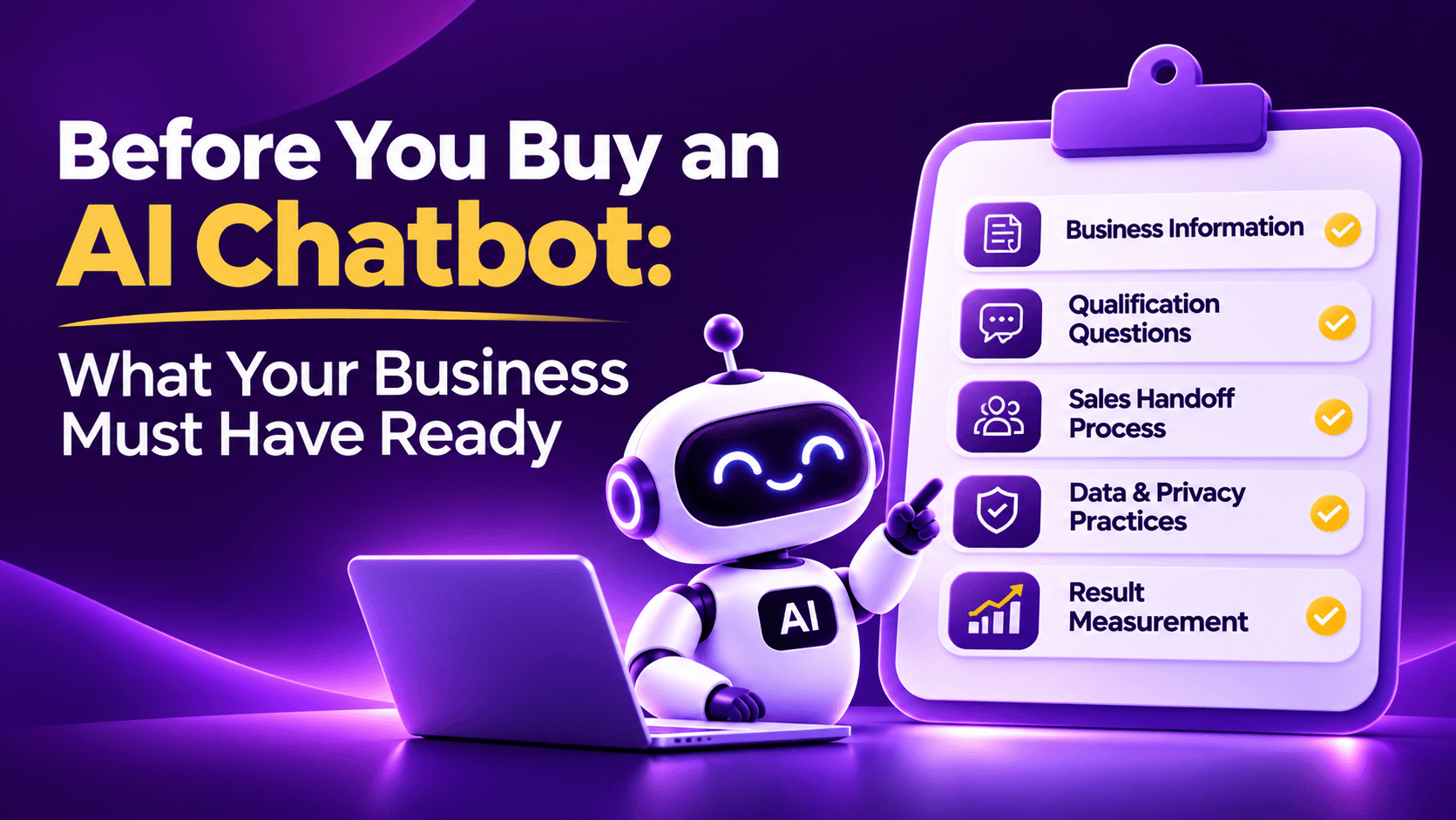
Before you buy an AI chatbot for your website, prepare five things: reliable business information, clear qualification questions, a defined sales handoff, responsible data practices, and a simple way to measure results. You do not need an elaborate technical infrastructure. You do need to know what a useful enquiry looks like and who is accountable for following it up. A chatbot cannot repair an unclear offer or an absent sales process on its own.
Most buying guides begin with features, vendors and pricing. Those questions matter, but an overlooked question should come first: is the organisation ready to put the tool to work?
A familiar situation: good software, disappointing results
Consider a growing education consultancy. It invests in a polished website and paid advertising, then buys an AI chatbot after an impressive demonstration. Within a fortnight, several issues appear. The fee information on the website does not match the latest brochure. Admissions staff have different ideas about what counts as a qualified lead. Leads reach a shared inbox that nobody owns. When the chatbot cannot confirm a policy, there is no agreed escalation route.
Marketing says the chatbot is producing leads. Sales says the leads are weak. The customer only knows that the promised callback never happened.
This is an illustrative scenario, not a reported MagicFlow AI customer outcome. It shows a problem that often goes unnoticed in software selection: technology can organise an enquiry but it cannot decide an admissions policy, correct contradictory product information or assign responsibility for the business.
Here is a practical readiness plan for organisations that want an AI chatbot to be more than a decorative website widget.
1. Define the outcome before comparing platforms
"We need an AI chatbot" describes a purchase, not a business outcome. Begin with the problem to solve. Do you need to answer routine questions outside office hours? Help visitors choose the right service? Capture campaign context with enquiries? Reduce irrelevant calls? Connect serious prospects to your sales team faster?
Choose one primary outcome and one supporting outcome. It is usually unwise to make the first implementation responsible for every problem in marketing, sales and support.
Write a sentence that a colleague could verify: "Every serious service enquiry should reach the right person with the customer requirement and a usable contact method." You now have a design brief. You can test whether the experience delivers it and decide what to improve.
Be precise about the difference between activity and value. Chat conversations are activity. A timely, informed follow up on a suitable enquiry is a business outcome. Your dashboard should help distinguish the two.
2. Get your source information into a trustworthy condition
An AI chatbot is often expected to explain what a business sells. If your website contradicts itself, the assistant may repeat the contradiction rather than solve it. Review the pages and documents that customers are likely to ask about.
Check services, product availability, pricing rules, eligibility, delivery areas, timelines, refund terms, operating hours and contact routes. Identify which version is authoritative when two documents disagree. An outdated brochure should not be treated as correct merely because it is conveniently available in PDF format.
Create a small content register with four columns: source, owner, last reviewed date and approved use. A spreadsheet works perfectly well. Someone must be accountable for keeping this information current after launch.
A knowledge base can make answers more consistent, but only when the material behind those answers is reliable. The practical question is not "How many pages can we upload?" It is "Which pages can we confidently stand behind?"
3. Collect the real questions customers ask
Your sales team, reception desk and customer support people probably hear the same questions every week. Start there. Ask them to list the ten or twenty questions that recur most often. You may discover that a small collection covers much of your first conversation.
For each question, prepare an approved answer and identify its limits. A course fee may depend on the intake. A service timeline may depend on the project's scope. A product quotation may depend on quantity. Do not instruct the bot to give one universal answer where none exists.
Ask the team to include the awkward questions, not just the pleasant ones. What if the business cannot serve the visitor's location? What if a product is unavailable? What if someone asks for a guarantee the company does not offer? A trustworthy assistant should be permitted to say, "I cannot confirm that. I can arrange for someone to check."
Test everyday phrasing, not just polished sentences. Visitors type abbreviations, fragmented thoughts, spelling errors and local expressions. The goal is to answer the underlying need clearly, not merely match a memorised FAQ heading.
4. Agree on what a qualified lead means
Marketing and sales sometimes use the term "qualified lead" differently. One team counts every person who shares a phone number. The other expects a prospect with a real requirement and a reasonable chance of progressing. That disagreement needs to be resolved before automation makes it larger.
For a digital services agency, qualification might involve service type, business problem and intended timeframe. For an education organisation, it might include programme interest, eligibility and preferred intake. For a real estate firm, location, property type and budget may matter. There is no universal field set.
Ask which details a salesperson genuinely needs to begin a useful conversation. Decide what is essential, what is optional and what is best left for the human call. A conversational assistant should provide helpful information between requests for details. It should not conduct an interrogation.
| Decision | Question to settle |
|---|---|
| Prospect fit | Which use cases or customer types can we serve? |
| Readiness | What signals that action is timely? |
| Contact | Which permitted method is required for follow up? |
| Routing | Which team should receive each type of enquiry? |
| Escalation | When must a person take over? |
| Exclusions | Which topics or data should the bot not collect? |
5. Give every lead a destination and an owner
"The chatbot will email the sales team" sounds complete until a group of people share one inbox. When everyone can respond, nobody may feel responsible.
Assign a primary owner, a backup, and an escalation rule. Decide whether the handoff goes to your CRM, an email queue or another system your team already uses. Perfect tooling is less important than predictable ownership.
The handoff should preserve the visitor's context. Aim to include the requirement, relevant page or campaign, a suitable contact channel, time of enquiry, and a short conversation summary. Do not pass sensitive details that the receiving team does not need.
One simple test reveals whether your process works: can the salesperson continue the conversation without asking the customer to explain everything again? If the prospect has already described the problem, the next human should know what it is.
6. Make your follow up promise realistic
A chatbot may be active while your office is closed. Your people may not be. That is acceptable as long as the next step is explained honestly.
Define response expectations for working hours, evenings, weekends and holidays. Distinguish an urgent callback request from a general information enquiry. If the team cannot call on Sunday, the chatbot should not promise a Sunday call. It can still capture the request and tell the visitor when someone is expected to respond.
Decide what happens when the assigned owner does not act. Perhaps a manager checks overdue enquiries, or an unclaimed item returns to a shared queue. The important part is that sending a notification is not mistaken for completing a follow up.
A lead capture tool should be supported by a small operating discipline. Without it, more leads can simply mean more unanswered conversations.
7. Decide which information is worth collecting
It is easy to turn a chatbot into a long contact form in disguise. The business wants every field; the visitor wants an answer. Good conversational design respects both interests.
Identify what is truly necessary for the next action. A name and a contact method may be necessary for a callback. A service category may be needed for routing. Other details can be collected during the sales conversation. Ask one question at a time, explain the reason where helpful, and avoid asking for the same information twice.
Be particularly careful with sensitive or unnecessary personal data. A website chatbot should not collect identity documents, health details, payment credentials or other sensitive information simply because a visitor is willing to type it. Establish permitted topics, retention practices, access permissions and a clear route for privacy enquiries. The applicable legal obligations depend on your business and jurisdiction; a privacy review should be part of launch approval rather than replaced by a generic compliance badge.
Also plan for deletion and correction requests. If you cannot explain where lead records are stored and who can access them, the business is not ready to collect more of them at scale.
8. Plan how marketing source information will travel
If paid traffic is part of your acquisition strategy, capturing only the customer's name and phone number leaves out useful context. A visitor arriving from a targeted campaign may have different expectations from someone reading a general blog article.
Agree on your campaign naming conventions, landing page ownership and the source fields that matter. The chatbot and receiving sales process should retain available UTM data alongside the lead. For teams using MagicFlow AI, the product's published features describe UTM source attribution and CRM ready routing. Verify the exact connector and plan requirements for your setup before making integration commitments.
Source information is not the same as customer intent. An advertisement can explain why the visitor arrived, but the conversation explains what the visitor currently needs. Sales should have both when the data is available. The aim is to continue the discussion intelligently, not to treat campaign labels as proof that a person is ready to purchase.
9. Set a voice that sounds like your business
A chatbot should reflect the organisation's natural way of speaking. A financial services website may need restraint and precision. An educational guidance website may need warmth and patience. An industrial supplier may need concise technical language.
Write a short voice guide. Specify how the assistant greets people, whether it uses formal or conversational language, how it explains uncertainty, what claims it must not make, and when it should offer human help. Give examples of acceptable and unacceptable responses.
Avoid sentences such as "As a revolutionary AI powered solution, I am delighted to serve you." Customers rarely speak that way. "I can help you check the options" is usually enough. The visitor should feel that the business understands the question, not that the business wants to demonstrate how clever its software is.
For multilingual websites, do not assume literal translation is sufficient. Review important answers and qualification questions in the languages customers actually use. Make sure your team can follow up in the language promised by the chatbot.
10. Prepare for what the chatbot must not do
Every business has situations where the assistant should stop and involve a person. Examples include a pricing exception, a complaint, a legal demand, a complex eligibility decision, a sensitive personal issue or a request to change an existing agreement.
Make the escalation criteria explicit. The chatbot should acknowledge its limits and provide the next available route. A handoff should include relevant conversation context so the visitor does not have to start again.
It is also useful to create a short list of prohibited claims. Do not promise refunds, discounts, regulatory approval, guaranteed results or precise delivery dates unless those statements are approved and current. An assistant that knows when not to answer is often safer and more useful than one that answers everything.
11. Prepare a small, realistic trial
You do not need to test every feature across the entire website on day one. Choose one high value page or enquiry journey. Write down the tasks visitors should complete, such as understanding a service, checking suitability and requesting a callback.
Run two kinds of tests. First, test whether the assistant answers correctly and follows your business rules. Second, test whether the handoff works operationally: did the right person receive the lead, understand the context and respond within the agreed period?
Use a sample of ordinary, awkward and unexpected questions. Include mobile testing, language variations, unavailable products, requests to speak with a human and questions for which the correct answer is "I do not know." Do not judge the tool by a perfectly rehearsed demonstration alone.
The platform you choose may offer managed deployment, but internal ownership still matters. Someone from your business should review source material, approve the conversation and assess the quality of incoming enquiries.
12. Create a readiness score before spending more
A practical way to align the team is to rate each area from zero to two. Zero means missing, one means partly prepared, and two means ready to test. This is an internal planning tool, not a certified industry score.
| Readiness area | Evidence to look for |
|---|---|
| Business objective | One agreed success definition |
| Approved content | Current source list with owners |
| Customer questions | Answers to frequent questions |
| Qualification rules | Minimum useful lead information |
| Routing ownership | Named primary and backup owners |
| Response policy | Clear expectations by enquiry type |
| Data practices | Approved collection and access rules |
| Campaign tracking | Consistent source fields where relevant |
| Voice and escalation | Sample responses and handoff rules |
| Trial measurement | Baseline and review date |
A realistic first month after purchase
First week: establish the baseline
Record how many website enquiries arrive now, how many are meaningful, how quickly staff respond and which pages produce the enquiries. Note data gaps rather than inventing baseline figures.
Second week: configure a narrow journey
Start with the pages and questions that matter most. Load approved information, set basic qualification rules, and connect the agreed handoff destination. Keep a human escalation path visible.
Third week: involve sales
Review real conversations with appropriate permissions. Identify questions that were misunderstood, leads that arrived without enough context, and promises that sounded too strong. Ask the people receiving the enquiries what would make the next conversation easier.
Fourth week: judge usefulness
Compare qualified enquiries and handling quality against the baseline. Do not focus only on chatbot opens. Decide which fixes belong to content, which belong to routing and which genuinely need a platform feature.
If your campaign mix or traffic changes during the trial, acknowledge that when interpreting results. A small website may not have enough volume to draw strong statistical conclusions in one month. The purpose of the initial review is disciplined learning, not a dramatic percentage for a presentation.
Questions to ask your own team before speaking with a vendor
These are different from the usual vendor comparison questions. They make the sales discussion more productive.
| # | Question |
|---|---|
| 1 | Which five customer questions must the chatbot answer correctly on launch day? |
| 2 | Where is the approved source for each answer? |
| 3 | What minimum details make an enquiry useful to sales? |
| 4 | Who receives the enquiry, and who is the backup? |
| 5 | What should the assistant say outside business hours? |
| 6 | Which data should never be requested in chat? |
| 7 | How will we know whether leads were acted upon? |
| 8 | Who has authority to approve changes to the knowledge and conversation flow? |
Why this helps
If these answers are clear, it becomes easier to assess software fit. The platform can then be evaluated against a specific workflow, rather than a long wish list copied from another company's feature page. When you do reach the vendor stage, our overview of chatbot companies in India and the pricing page can help you compare options.
Buy the capability, but prepare the organisation
An AI chatbot can be a useful part of a website's lead generation and customer guidance process. It can answer questions, gather context and route an enquiry. Its business value depends on the information it is given and the people who receive its output.
MagicFlow AI offers conversational lead capture, custom qualification, knowledge based answers, source attribution and routing options. Those capabilities are most effective when a business knows its customer questions, has reviewed its content and has a dependable follow up process. The best purchase decision is not merely "Which chatbot has more features?" It is "Which problem are we ready to solve well?"
- MagicFlow AI, Features https://www.magicflowai.io/features
- MagicFlow AI, Pricing https://www.magicflowai.io/pricing
- Google Search Central, Creating helpful, reliable, people-first content https://developers.google.com/search/docs/fundamentals/creating-helpful-content
Common questions from this article.

Chief Marketing and AI Officer (CMAIO), MagicWorks IT Solutions
Mohan Chute is Chief Marketing and AI Officer at MagicWorks IT Solutions, with 23+ years across go-to-market strategy, technology, and digital transformation. He built and scaled MagicFlow AI from concept to client deployment and pioneered the agency's AEO/GEO practice, helping brands earn visibility in AI-generated answers across ChatGPT, Perplexity, and Gemini.